Home/Blogs & Insights/Website Architecture for SEO and AI Search: How to Structure Pages, URLs and Content the Right Way
Web Development
Website Architecture for SEO and AI Search: How to Structure Pages, URLs and Content the Right Way
Good architecture helps users navigate, search engines crawl, and AI systems understand relationships between your content. Learn the Clutch Site Authority Pyramid and how to structure your site.
Vince Beekel
Jun 26, 202613 min read
Table of Contents
Website architecture is the structural foundation that determines whether users can find what they need, search engines can discover and understand your pages, and AI systems can interpret the relationships between your content. It is not the same as design. Design is how the site looks. Architecture is how it is organized, connected, and structured underneath the surface.
Good architecture helps users navigate intuitively, helps search engines crawl and index efficiently, and helps AI and answer systems understand how your services, topics, and content relate to each other. Poor architecture creates orphan pages, excessive crawl depth, confusing URLs, and disconnected content that neither users nor search systems can navigate effectively.
This article explains how to structure pages, URLs, and content for SEO and AI search discoverability. For the broader framework of how visibility, websites, and measurement connect, read our guide to Multi-Engine Optimization. For conversion infrastructure, see our article on high-converting websites.
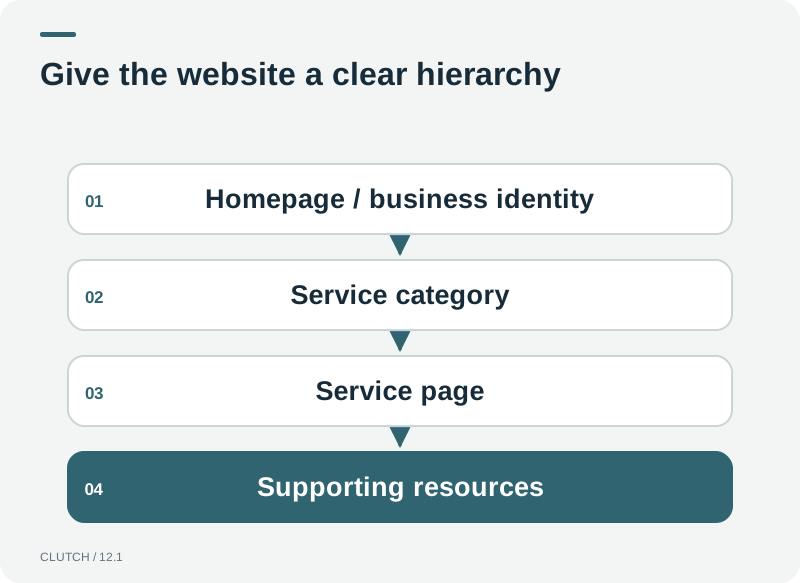
Website architecture is the structural foundation that determines how users, search engines, and AI systems navigate and understand your content.
What Is Website Architecture?
Website architecture is the organizational structure of your site's pages, URLs, navigation, and internal links. It defines how pages relate to each other, how deep they are from the homepage, how URLs are constructed, and how link authority flows through the site. Architecture is the skeleton that design and content are built on top of. A site with good architecture is easy to navigate, easy to crawl, and easy to understand. A site with poor architecture is confusing regardless of how good the content or design may be.
Architecture matters for three audiences simultaneously. Human visitors need to find information quickly and understand where they are in the site. Search engines need to discover pages, understand their relationships, and determine their relevance. AI and answer systems need to interpret how entities, topics, and services relate to each other. Good architecture serves all three. Poor architecture confuses all three.
The Clutch Site Authority Pyramid
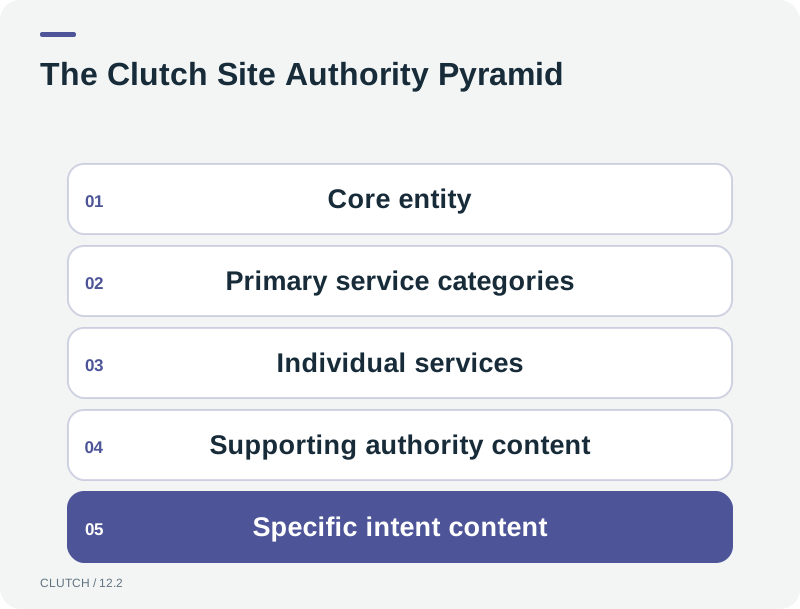
Clutch organizes website architecture into five levels, from the broadest and most authoritative at the top to the most specific and supportive at the bottom. Authority and internal links flow naturally between levels, creating a structure where the most important pages receive the strongest signals and the supporting content reinforces them.
The Clutch Site Authority Pyramid organizes content into five levels, with authority flowing naturally between them.
Level 1: Core Entity
The homepage represents the core entity, which is the company itself. It establishes the company identity, the primary value proposition, and the main navigation paths to all other content. The homepage is the most authoritative page on the site and should link to all primary service categories. It is the top of the pyramid and the entry point for most direct traffic and brand searches.
Level 2: Primary Service Categories
Primary service categories are the main divisions of what the business offers. For Clutch, these are Web Development, Marketing, and AI Solutions. Each category has its own page and URL path, such as /web-development/ or /ai-solutions/. These pages link to the homepage and to their individual services. They are the second tier of authority and the primary navigation path for users exploring services.
Level 3: Individual Services
Individual services are the specific offerings within each category. Under Web Development, these might include Smart Websites, E-Commerce, and Landing Pages. Under AI Solutions, these might include AI Sales Agents and AI Automations. Each service has its own URL under its parent category, such as /web-development/smart-sites/ or /ai-solutions/ai-sales-agent/. These pages link to their parent category and to supporting content.
Level 4: Supporting Authority Content
Supporting authority content includes guides, comparisons, FAQs, case studies, research, and blog articles that reinforce the service pages. This content does not sell directly but provides the depth, evidence, and topical coverage that search engines and AI systems use to evaluate authority. Supporting content links to relevant service pages, creating bidirectional authority flow. The blog is a key component of this level, providing topical depth that supports the entire site.
Level 5: Specific Intent Content
Specific intent content addresses long-tail questions, industry-specific use cases, location content where legitimate, and decision-stage content. This is the most granular level, targeting specific queries that prospects search late in their buying journey. It links upward to supporting content and service pages, creating a path from specific questions to broader services. This level ensures that the site captures prospects at every stage of their research process.
Sample Architecture
The following is a conceptual example of how a clean architecture might be structured. The specific URLs should reflect the actual business and should be inspected against the live site before implementation.
This structure keeps important service pages within two to three clicks of the homepage, groups related services under clear parent categories, and uses descriptive URLs that communicate the page's topic to both users and search engines. The blog sits alongside the service structure and links into it, creating the bidirectional authority flow that strengthens both the service pages and the supporting content.
How Deep Should Important Pages Be?
Important service pages should be within two to three clicks of the homepage. Crawl depth, the number of clicks required to reach a page from the homepage, affects how easily search engines discover and prioritize content. Pages buried five or six clicks deep may be crawled less frequently and with lower priority. The general principle is that the most important pages should be the easiest to reach, both for users and for crawlers.
This does not mean every page should be one click from the homepage. That would create an unnavigable menu. It means that the architecture should be shallow for important content and deeper for granular content. A service page should be two clicks away. A blog article about a specific question related to that service can be three or four clicks away, linked from the service page and the blog hub.
What Makes a Good URL?
A good URL is descriptive, readable, and structured to communicate the page's topic and its place in the site hierarchy. It should use lowercase letters, hyphens to separate words, and no unnecessary parameters or session IDs. It should reflect the content's topic, not the technology that produced it. A URL like /web-development/smart-sites/ communicates both the service and its parent category. A URL like /page?id=4291 communicates nothing.
URLs should be stable. Changing a URL after a page has been indexed breaks links, loses accumulated authority, and requires redirects to preserve traffic. Plan URLs carefully at the architecture stage so they do not need to change later. When URLs do change, implement 301 redirects from the old URL to the new one to preserve authority and prevent broken links.
Should Service Pages Live in Folders?
Service pages benefit from living in folders that reflect their parent category. A URL like /web-development/smart-sites/ communicates to both users and search engines that Smart Sites is a service within Web Development. This creates a hierarchical structure that is easy to understand and crawl. Flat URLs, where every page sits at the root level, do not communicate relationships and make the site harder to navigate at scale.
Folder structure also helps with analytics and site management. It is easier to report on all traffic to /web-development/ when the pages share a common path prefix. It is easier to manage redirects, canonical tags, and schema markup when the URL structure reflects the actual content hierarchy.
What Are Breadcrumbs?
Breadcrumbs are navigational elements that show a user's location within the site hierarchy. They typically appear at the top of a page and show the path from the homepage to the current page, such as Home > Web Development > Smart Websites. Breadcrumbs help users understand where they are and navigate back to broader categories. They also provide search engines with additional context about the page's position in the site structure.
Breadcrumbs can be marked up with BreadcrumbList structured data, which helps search engines understand the hierarchy and can enable breadcrumb display in search results. The structured data should match the visible breadcrumb navigation on the page, not be added invisibly.
How Should Navigation Work?
Navigation should reflect the site's architecture and provide clear paths to all important content. The main navigation menu should include primary service categories and key pages like Contact and Blog. Dropdown or mega-menu structures can organize many services without overwhelming the visitor, but they should be tested on mobile to ensure they are usable with touch navigation. The goal is to allow a visitor to reach any important service page within two clicks from any page on the site.
What Are Orphan Pages?
Orphan pages are pages that exist on the site but are not linked from any other page. They are unreachable through navigation and can only be found if a visitor knows the exact URL. Orphan pages are a problem because search engines discover pages primarily by following links. A page with no internal links may not be discovered or may be considered unimportant because it receives no internal authority signals.
Orphan pages commonly occur when content is created but not integrated into the site's navigation or internal linking structure. A blog article that is published but not linked from the blog hub, or a service page that is created but not added to the navigation menu, becomes an orphan. Regular architecture audits should identify and fix orphan pages by adding appropriate internal links.
How Does Internal Linking Affect Authority?
Internal links distribute authority across the site. The homepage typically has the most external authority and passes that authority through links to the pages it connects to. Those pages pass authority to the pages they link to, creating a flow from the top of the pyramid down. Strategic internal linking ensures that the most important service pages receive sufficient authority to compete for competitive search terms.
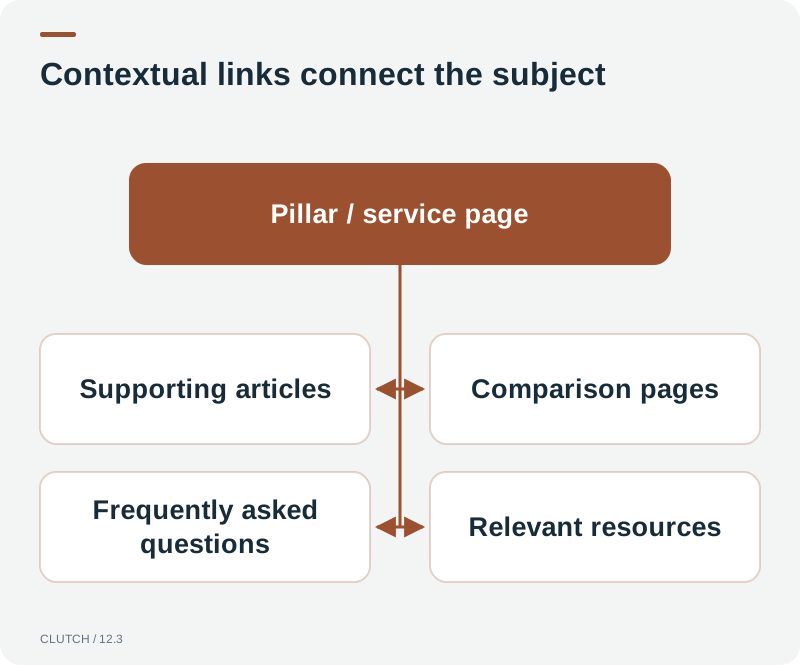
Internal authority flow: contextual links create bidirectional relationships that strengthen both service pages and supporting content.
The most valuable internal links are contextual, meaning they appear within relevant content rather than in a footer or sidebar. A link from a blog article about high-converting websites to a service page about Smart Websites is more valuable than a generic link in a footer because it provides topical context. Contextual links with descriptive anchor text help both users and search engines understand the relationship between the linked pages.
What Is Crawl Depth?
Crawl depth is the number of clicks required to reach a page from the homepage. Pages at depth one are linked directly from the homepage. Pages at depth two require two clicks. Search engines allocate crawl budget based on depth and importance. Pages that are deep and have few internal links may be crawled less frequently or not at all. Keeping important pages within two to three clicks of the homepage ensures they are discovered and prioritized by crawlers.
Should Every Page Appear in the Menu?
No. The navigation menu should include the most important pages and categories, not every page on the site. A menu with fifty links overwhelms users and dilutes the authority passed through each link. The menu should provide paths to primary service categories and key pages. Individual service pages and supporting content should be linked from their parent pages and from relevant content throughout the site, not from the main menu. The menu provides the primary paths, and internal linking provides the secondary paths.
How Should Blogs Support Service Pages?
A blog supports service pages by creating topical depth around the subjects the service pages target. A service page about Smart Websites competes for a broad, competitive keyword. Blog articles about specific aspects of smart websites, such as CRM integration, AI chat, or lead routing, target more specific queries and link back to the service page. This creates a content cluster where the service page is the pillar and the blog articles are the supporting content.
The cluster structure strengthens the service page by providing it with internal links from topically relevant content. It also captures long-tail search traffic that the service page alone would not attract. A visitor who searches for how to connect a website to a CRM may find a blog article, read it, and follow a contextual link to the Smart Websites service page. The blog creates entry points that the service page cannot create on its own.
How Should Location Pages Be Structured?
Location pages should only be created when a business genuinely serves specific locations and has unique, valuable content for each location. A page for each city the business serves makes sense if the services, team, case studies, or approach differ by location. Creating hundreds of near-identical pages with only the city name changed creates doorway pages, which search engines consider spam and may penalize.
Legitimate location pages should contain unique content: location-specific case studies, team information, service details, testimonials from local clients, and genuinely useful information for visitors in that area. If the only difference between pages is the city name, the pages are not adding value and should not exist. For businesses with a single location or a service area that does not require location-specific pages, focus on local SEO through Google Business Profile rather than creating location pages.
How Do You Avoid Doorway Pages?
Doorway pages are pages created solely to rank for specific search queries without providing unique value. They typically target location or keyword variations with near-identical content. Google's guidelines consider doorway pages spam because they are designed to manipulate rankings rather than serve users. To avoid doorway pages, ensure that every page provides unique, valuable content that would be useful to a visitor regardless of its search performance. If a page exists only to rank and not to help a user, it should not exist.
How Should E-Commerce Architecture Differ?
E-commerce architecture has additional layers: product categories, individual product pages, and faceted navigation for filtering and sorting. Product pages should be within a clear category hierarchy, and each product should have a stable, descriptive URL. Faceted navigation, which allows users to filter by attributes like size, color, or price, can create thousands of URL variations that create duplicate content issues if not handled correctly.
Handle faceted navigation carefully. Use canonical tags, robots directives, or URL parameter handling in Search Console to prevent search engines from indexing every filtered combination. Ensure that the base category pages, which are the pages you want to rank, are not diluted by hundreds of filtered variations competing for the same content.
What Should Go in an XML Sitemap?
An XML sitemap should include all important, indexable pages that you want search engines to discover and index. This includes service pages, blog articles, category pages, and any other content that should appear in search results. It should not include pages you do not want indexed, such as thank-you pages, internal search results, or filtered URL variations. The sitemap is a signal to search engines about which pages matter. It does not guarantee indexing, but it helps crawlers discover content efficiently.
Keep the sitemap updated as content is added or removed. Submit it through Google Search Console to monitor its status and identify any issues. A sitemap with broken links or redirected URLs creates a poor signal, so maintain it alongside your content updates.
What Role Does Schema Play?
Schema markup, or structured data, provides search engines with explicit information about what a page contains and how its elements relate. It helps search engines understand the entity, the services offered, the organization behind the site, and the relationships between content. Schema does not guarantee rankings or AI citations, but it makes it easier for systems to interpret your content accurately.
Relevant schema types for architecture include Organization schema for the business entity, BreadcrumbList for navigation hierarchy, Service schema for individual service pages, Article schema for blog posts, and WebPage schema for general pages. Schema should match the visible content on the page. Do not add schema for content that does not exist on the page, as this creates a mismatch that search engines may penalize.
How Does Semantic HTML Help?
Semantic HTML uses elements that communicate meaning: header, nav, main, article, section, aside, and footer. These elements tell both browsers and assistive technologies what each part of the page is. They also help search engines understand the structure and hierarchy of the content. A page that uses proper heading tags in the correct order, with one H1 and logical H2 and H3 hierarchy, is easier to interpret than a page that uses styled divs for everything.
Semantic HTML also supports accessibility, which is both a user experience factor and a search quality signal. Accessible sites serve more users and provide cleaner signals for search and AI systems to interpret. Using semantic elements is a foundational architecture practice that benefits users, search engines, and AI systems simultaneously.
How Does Architecture Support AI Search?
AI and answer systems interpret websites by understanding the relationships between entities, topics, and content. Clear architecture with descriptive URLs, logical hierarchy, and contextual internal links helps these systems understand how your services relate to each other, what topics your site covers, and which pages are authoritative for specific subjects. A well-architected site provides clearer signals for AI systems to interpret than a chaotic, disorganized site.
This does not require special AI-specific markup. The same architecture that serves users and search engines serves AI systems. Clear hierarchy, descriptive URLs, semantic HTML, structured data, and contextual internal linking create a site that is interpretable by all three audiences. The architecture is the foundation for Multi-Engine Optimization, which addresses visibility across all discovery environments. For more on AI search discoverability, read our guide to getting found in ChatGPT, Google AI Mode, and other AI platforms.
Bad Website Architecture vs. Good Website Architecture
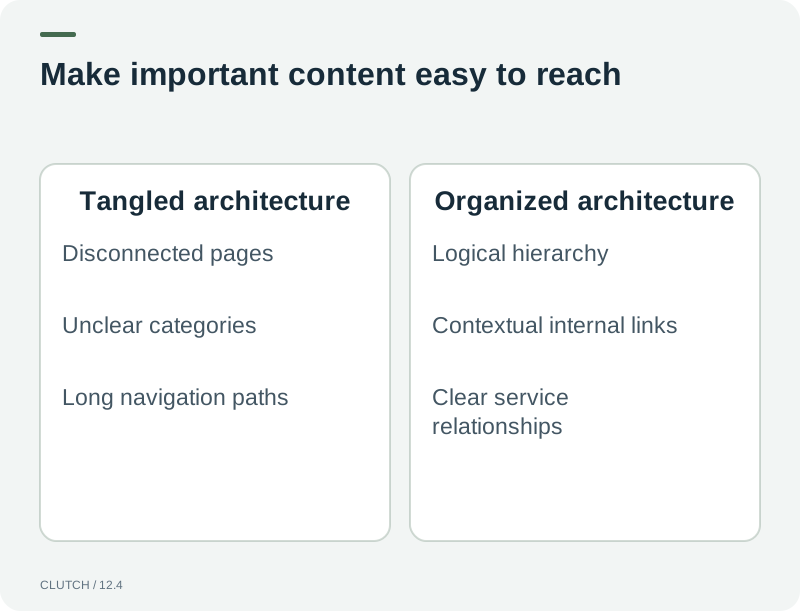
Bad architecture is tangled and deep. Good architecture is organized, shallow, and logically hierarchical.
The difference between bad and good architecture is not subtle. Bad architecture creates confusion at every level. Good architecture creates clarity for every audience.
Location pages, if present, contain unique content for each location
301 redirects are in place for any URLs that have changed
Site hierarchy aligns with how users and search engines understand the business
Frequently Asked Questions
Frequently Asked Questions
What is website architecture for SEO?
Website architecture for SEO is the organizational structure of your pages, URLs, navigation, and internal links. It determines how easily search engines can discover, crawl, and understand your content. Good architecture keeps important pages shallow in the hierarchy, uses descriptive URLs, connects related pages through internal links, and organizes content in a logical structure that reflects how users and search engines understand your business.
How deep should important pages be in my site structure?
Important service pages should be within two to three clicks of the homepage. Crawl depth affects how easily search engines discover and prioritize content. Pages buried five or six clicks deep may be crawled less frequently. The most important pages should be the easiest to reach for both users and crawlers, while granular content can be deeper if it is linked from relevant parent pages.
Should service pages live in URL folders?
Yes. Service pages benefit from living in folders that reflect their parent category, such as /web-development/smart-sites/. This communicates the relationship between the service and its category to both users and search engines. It creates a hierarchical structure that is easy to crawl and understand, and it helps with analytics reporting by grouping related pages under a common path prefix.
What are orphan pages and why are they a problem?
Orphan pages are pages that exist on the site but are not linked from any other page. They are unreachable through navigation and can only be found if a visitor knows the exact URL. Search engines discover pages primarily by following links, so orphan pages may not be discovered or may be considered unimportant. Regular architecture audits should identify orphan pages and add appropriate internal links to integrate them.
Does schema markup help with AI search?
Schema markup helps search and AI systems understand what your content is about and how elements relate. It does not guarantee AI citations or rankings, but it makes your content easier to interpret accurately. Relevant schema types include Organization, BreadcrumbList, Service, and Article. Schema should match the visible content on the page. Do not add schema for content that does not exist.
How should blogs support service pages?
Blogs support service pages by creating topical depth around the subjects the service pages target. Blog articles about specific aspects of a service target long-tail queries and link contextually back to the service page. This creates a content cluster where the service page is the pillar and the articles are the supporting content. The cluster strengthens the service page with internal links and captures search traffic the service page alone would not attract.
Should I create location pages for every city I serve?
Only if you have unique, valuable content for each location. Creating hundreds of near-identical pages with only the city name changed creates doorway pages, which search engines consider spam. Legitimate location pages should contain unique content: local case studies, team information, specific service details, and genuinely useful information. If the only difference is the city name, focus on local SEO through Google Business Profile instead.
How does website architecture affect AI search visibility?
AI and answer systems interpret websites by understanding relationships between entities, topics, and content. Clear architecture with descriptive URLs, logical hierarchy, and contextual internal links helps these systems understand how your services relate and which pages are authoritative for specific subjects. The same architecture that serves users and search engines serves AI systems. No special AI-specific markup is required, just clear, well-structured architecture.
Build a website architecture designed for users, search engines, and modern AI-powered discovery.
Architecture is the foundation that determines whether your content can be found, understood, and connected. Clutch Digital Development structures websites so that users, search engines, and AI systems can all navigate your content effectively and understand the relationships between your services, topics, and expertise.
Tags:#website architecture for SEO#SEO site architecture#website structure SEO#SEO URL structure#site hierarchy SEO#website structure for AI search#internal linking structure#information architecture
READY TO PUT AI TO WORK?
What Could an AI Sales Agent Do for Your Business?
Every business handles leads differently. We'll look at your current sales process, lead volume, response times, follow-up, staffing, and opportunities to determine where an AI Sales Agent could have the biggest impact.
Search discovery expanded beyond a single results page. Multi-Engine Optimization is the framework for staying visible across organic search, AI answers, conversational platforms, and more without abandoning proven SEO fundamentals.
There is no guaranteed switch for AI search visibility, but there is a practical set of things businesses can control. This implementation guide covers the AI Visibility Stack and step-by-step actions for being discovered and cited.
Content written only for algorithms is generic. Content written only for AI is the same problem in a different wrapper. The Three-Audience Content Model and Content Value Stack show how to serve all three simultaneously.