Home/Blogs & Insights/12 Signs Your Website Is Costing You Leads, Sales and Search Visibility
Web Development
12 Signs Your Website Is Costing You Leads, Sales and Search Visibility
A website that looks acceptable can still be quietly losing leads through structural problems, technical gaps, and conversion friction. Use the Website Problem Severity Scale to diagnose what needs fixing.
Vince Beekel
Jul 3, 202614 min read
Table of Contents
Businesses invest in traffic. They pay for search ads, social ads, SEO, content, and email campaigns to drive visitors to their website. Then they wait for leads. When the leads do not come, the assumption is often that the traffic is bad or the marketing is not working. Sometimes that is true. Often, the traffic is fine and the website is the problem.
A website that looks acceptable can still be quietly losing leads, sales, and search visibility through structural problems, technical gaps, and conversion friction that are invisible without a diagnostic approach. This article identifies twelve signs that your website is costing you business and provides a framework for evaluating whether the problem requires optimization, repair, or a complete rebuild.
For the broader framework of how visibility, websites, and measurement connect, read our guide to Multi-Engine Optimization. For the conversion infrastructure that a revenue-generating website requires, see our article on high-converting websites.
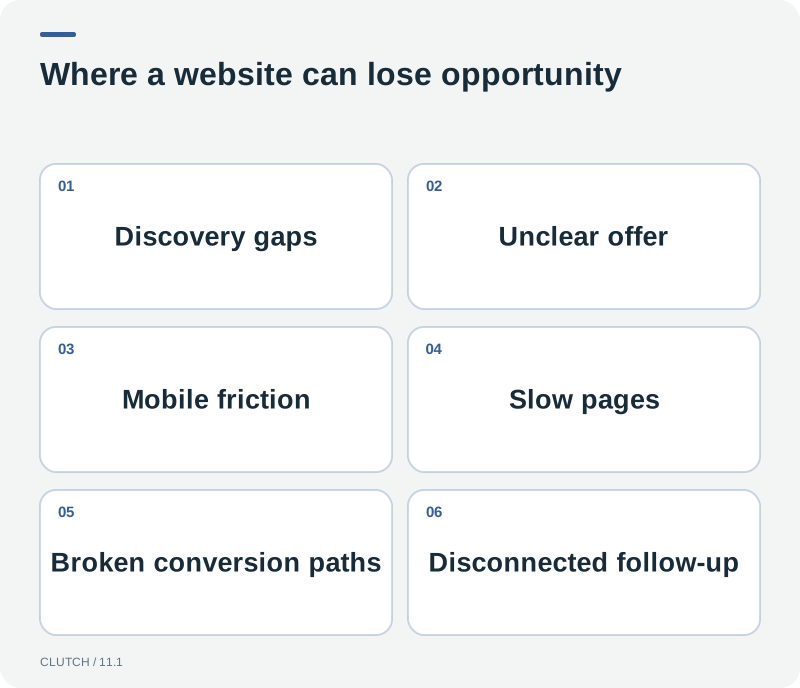
A website can look functional while quietly losing leads, sales, and search visibility through structural and technical problems.
The Website Problem Severity Scale
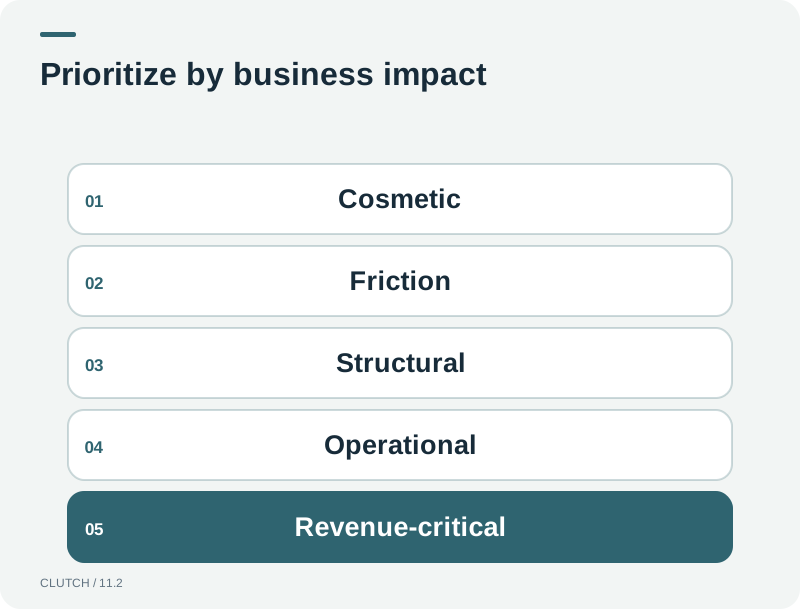
Not all website problems are equal. Some are cosmetic and affect perception. Others are structural and affect search visibility, conversion, or scalability. Clutch categorizes website problems into five severity levels to help businesses prioritize what to fix first and what to leave for later.
The Website Problem Severity Scale helps businesses prioritize which problems to fix first based on their impact.
Level 1: Cosmetic
Cosmetic problems are visual. Outdated typography, inconsistent spacing, low-quality images, or a design that feels dated. These affect perception and credibility but do not directly prevent conversion or search visibility. A website with cosmetic problems can still function and rank if the underlying structure is sound. Fixing cosmetic issues is worthwhile but should not take priority over structural or operational problems.
Level 2: Friction
Friction problems hurt usability or conversion. Long forms, unclear navigation, missing calls to action, mobile layout issues, or slow-loading pages. These problems directly reduce the percentage of visitors who convert. A website with friction problems receives traffic but wastes it. Fixing friction is often the highest-ROI improvement because it increases conversion from existing traffic without requiring additional spending on acquisition.
Level 3: Structural
Structural problems affect architecture, SEO, navigation, or scalability. Poor URL structure, missing internal links, orphan pages, duplicate content, or a site hierarchy that does not align with how users and search engines understand the business. These problems limit search visibility and make it harder for both users and crawlers to find and understand your content. Structural problems require more effort to fix than friction problems but are essential for long-term visibility.
Level 4: Operational
Operational problems break tracking, integrations, automation, or lead handling. A form that sends to an unmonitored inbox. A CRM that is not connected. Call tracking that is missing. Analytics that are not configured to track conversions. These problems mean that even when the website captures leads, the business cannot track, route, or follow up effectively. Operational problems are the most easily overlooked because the website appears to work, but the business outcomes are silently degraded.
Level 5: Revenue-Critical
Revenue-critical problems directly limit lead generation, sales, or marketing growth. A website that cannot handle the company's current service offerings, a booking system that does not work, forms that are broken, or a site that cannot integrate with the sales tools the business needs to scale. These problems mean the website is actively preventing the business from growing. Revenue-critical problems require immediate attention because every day they persist costs the business leads and sales.
12 Signs Your Website Is Costing You Leads, Sales and Search Visibility
The following twelve signs cover the most common and costly website problems. Each sign includes what the problem looks like, why it matters, how to diagnose it, and what kind of fix it requires.
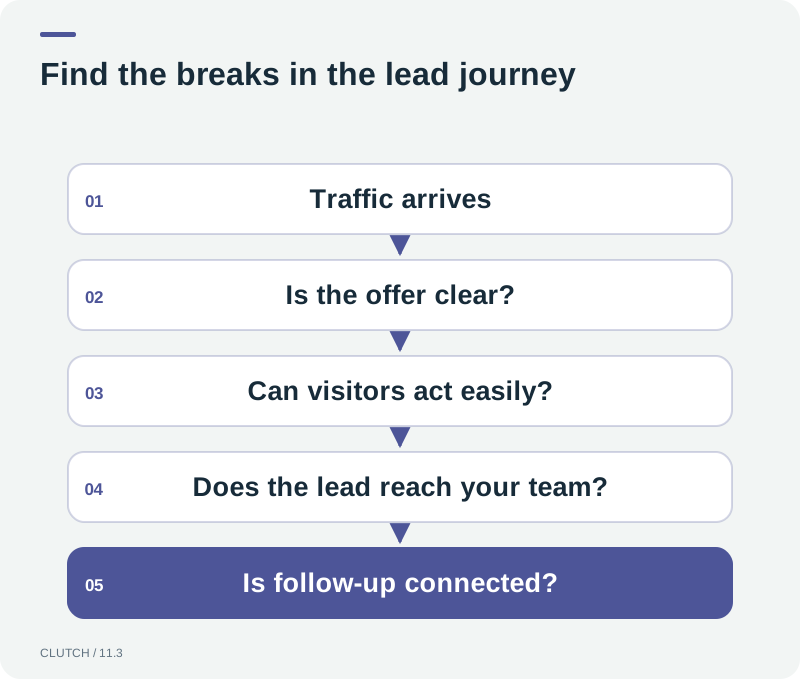
Hidden revenue leaks: traffic enters the system but leads are lost through multiple points of friction.
1. Traffic arrives but leads do not
What it looks like: Google Analytics shows consistent traffic, but form submissions, phone calls, and bookings remain low. The conversion rate is below what the traffic volume should produce.
Why it matters: This is the clearest signal that the website has a conversion problem, not a traffic problem. Spending more on traffic without fixing conversion increases the waste rather than the results.
How to diagnose it: Compare traffic volume to conversion actions in analytics. Calculate your conversion rate. If it is below 1 percent for service businesses or below 2 percent for e-commerce, the conversion path needs examination. Review heatmaps and session recordings to see where visitors drop off.
Fix: Conversion optimization. This is a Level 2 friction problem that requires improving messaging, calls to action, form design, and the conversion path. It does not necessarily require a full rebuild.
2. Visitors cannot immediately understand what the business does
What it looks like: The hero section uses vague language, industry jargon, or aspirational taglines that do not communicate the actual service. Visitors must scroll or click to determine what the company offers.
Why it matters: Visitors make a decision about whether to stay within seconds. If they cannot determine relevance quickly, they leave. This increases bounce rate and reduces the percentage of traffic that has any chance of converting.
How to diagnose it: Show your homepage to someone unfamiliar with your business and ask them to explain what you do after five seconds. If they cannot, your clarity layer has a problem.
Fix: Content improvement. Rewrite the hero section, value proposition, and service descriptions for clarity. This is a Level 2 friction problem that requires messaging work, not technical changes.
3. Mobile users struggle to navigate or convert
What it looks like: The site looks acceptable on desktop but navigation, forms, or calls to action are difficult to use on a phone. Menus are hard to open, forms require too much typing, or buttons are too small to tap accurately.
Why it matters: For many businesses, the majority of traffic arrives on mobile. A site that works on desktop but not mobile is losing the majority of its opportunities. Mobile problems are friction problems that directly reduce conversion.
How to diagnose it: Test every conversion path on an actual phone. Try to submit a form, call the business, and navigate to a service page using only your thumb. If any step is difficult, mobile users are abandoning.
Fix: Mobile optimization. This may be Level 2 friction or Level 3 structural depending on whether the issue is styling or architecture. If the site was not built mobile-first, it may require a structural redesign of the mobile layout.
4. Important pages load too slowly
What it looks like: Pages take several seconds to load on mobile connections. Images are large, scripts are unoptimized, or the server is slow. Google PageSpeed Insights scores are low for primary landing pages.
Why it matters: Page speed affects both conversion and search visibility. Google's Core Web Vitals are part of the page experience signals. Slow pages increase bounce rates and reduce the crawl budget Google allocates to the site. This is both a friction and a structural problem.
How to diagnose it: Run your primary pages through Google PageSpeed Insights. Review the specific issues identified, such as large images, render-blocking resources, or slow server response times. Check both mobile and desktop scores.
Fix: Technical optimization. Image compression, script deferral, server improvements, and removing unnecessary third-party scripts. This is a Level 2 to Level 3 problem depending on severity.
5. Search engines struggle to discover important pages
What it looks like: Google Search Console shows that important service pages are not indexed, have crawl errors, or are not receiving impressions. The XML sitemap is missing, outdated, or does not include key pages.
Why it matters: Pages that search engines cannot discover cannot appear in search results. This limits organic visibility for your most valuable service pages. It is a structural problem that directly affects revenue.
How to diagnose it: Review Google Search Console's coverage report. Check for crawl errors, excluded URLs, and pages not indexed. Verify your XML sitemap includes all important pages and that canonical tags are correct.
Fix: Technical SEO repair. Update the sitemap, fix crawl errors, improve internal linking to important pages, and ensure canonical configuration is correct. This is a Level 3 structural problem.
6. Website architecture has grown chaotic
What it looks like: Pages have accumulated without a clear hierarchy. URLs are inconsistent, some pages are five clicks deep, navigation menus are overcrowded, and related pages are not connected through internal links.
Why it matters: Chaotic architecture confuses users and search engines. It makes it harder for visitors to find what they need and harder for crawlers to understand the relationships between your pages. It also makes the site harder to maintain and scale. This is a Level 3 structural problem.
How to diagnose it: Review your site's URL structure and navigation. Count the clicks required to reach important service pages. Look for orphan pages that are not linked from anywhere. If the structure is not logical and shallow, it needs reorganization.
Fix: Architecture redesign. Reorganize the URL structure, navigation, and internal linking. This may require redirects for changed URLs. It is a Level 3 structural problem that requires planning but not necessarily a full visual redesign.
7. Service pages are thin or overly generic
What it looks like: Service pages contain a paragraph or two of generic description without specifics about what the service includes, who it is for, what the process is, or what the next steps are. The same content could appear on any competitor's site.
Why it matters: Thin pages do not rank well, do not answer customer questions, and do not differentiate your business. They fail both search engines and human visitors. This is a Level 2 to Level 3 problem depending on how many pages are affected.
How to diagnose it: Review your service pages. Do they explain what makes your approach different? Do they address common questions? Do they include a clear next step? If the content could be copied to a competitor's site without changes, it is too generic.
Fix: Content improvement. Rewrite service pages with specificity, process descriptions, FAQs, and clear calls to action. This is content work, not technical work, though it may benefit from structural improvements to support the new content.
8. Forms create unnecessary friction
What it looks like: Lead forms have many required fields, ask for information that could be collected later, or do not function properly on mobile. The submit button may be below the fold or visually unclear.
Why it matters: Every additional form field reduces submission rates. Forms that are difficult to complete on mobile block the majority of visitors from converting. This is a Level 2 friction problem that directly costs leads.
How to diagnose it: Count the fields on your lead forms. Test them on mobile. If you would hesitate to complete the form yourself on a phone, your visitors are hesitating too.
Fix: Form optimization. Reduce fields to the minimum needed, improve mobile usability, and make the submit button clear and accessible. This is a Level 2 friction problem that can be fixed quickly.
9. Calls, forms, and booked appointments are not properly tracked
What it looks like: The business cannot determine which pages, traffic sources, or campaigns generate calls, form submissions, or bookings. Phone calls are not tracked. Form submissions are not connected to CRM records. Bookings are not attributed to their source.
Why it matters: Without tracking, you cannot know which marketing investments produce results. You may be spending on traffic sources that generate clicks but not leads, while underinvesting in sources that actually convert. This is a Level 4 operational problem that silently wastes marketing budget.
How to diagnose it: Check whether call tracking is in place. Verify that form submissions appear in your CRM with source data. Confirm that analytics tracks conversion actions, not just page views. If you cannot answer the question, where did this lead come from, tracking is incomplete.
Fix: Integration and tracking setup. Implement call tracking, configure conversion tracking in analytics, connect forms to CRM, and set up attribution models. This is a Level 4 operational problem that requires technical configuration.
10. Leads fall into a dead end after conversion
What it looks like: When a visitor submits a form, the lead goes to an email inbox that is checked periodically. There is no automatic notification, no CRM entry, no immediate response, and no follow-up sequence. The lead sits until a human processes it manually.
Why it matters: Speed to lead matters. A lead that receives a response within minutes converts better than one that receives a response hours later. A dead end after conversion wastes the effort and investment that produced the lead. This is a Level 4 operational problem.
How to diagnose it: Submit a test form on your own site. Time how long it takes to receive a response. Check whether the lead appears in your CRM automatically. If the answer is hours rather than minutes, or never rather than automatically, you have a dead end problem.
Fix: CRM integration and automation. Connect form submissions to CRM, set up immediate notifications, trigger automated responses, and configure follow-up sequences. This may involve AI Sales Agents for immediate qualification and booking.
11. Marketing campaigns require workarounds because the site lacks integrations
What it looks like: Running paid campaigns requires creating standalone landing pages because the main site cannot handle campaign-specific offers. Form data has to be manually exported and imported into the CRM. Booking links do not sync with the calendar.
Why it matters: Workarounds slow everything down, introduce errors, and make it harder to scale marketing efforts. Each workaround is a manual process that breaks when the person who created it is unavailable. This is a Level 4 operational problem that limits marketing efficiency.
How to diagnose it: List the manual steps involved in launching a new campaign. If the list includes data export, import, manual CRM entry, or custom landing page creation for every campaign, the site lacks the integrations needed for efficient marketing operations.
Fix: Integration and automation setup. Connect the website to CRM, marketing automation, and analytics so that campaign data flows automatically. Consider whether a Smart Website approach would eliminate the need for workarounds.
12. The website cannot support the company's current growth strategy
What it looks like: The business has grown, added services, entered new markets, or changed its model, but the website has not kept up. Pages for new services do not exist or are crammed into an old structure. The navigation cannot accommodate the current service lineup. The site does not reflect the actual business.
Why it matters: A website that does not reflect the current business is not just a cosmetic problem. It means prospects are seeing an outdated version of the company, which reduces credibility and misrepresents your capabilities. This is a Level 5 revenue-critical problem because it directly limits the business's ability to grow.
How to diagnose it: Compare your current service offerings, pricing, and business model to what the website presents. If the gap is significant, the website is holding the business back. If adding a new service requires a workaround rather than a natural addition, the architecture is too rigid.
Fix: This depends on the gap. If the architecture is sound but content is outdated, content improvement suffices. If the architecture cannot accommodate the current business, a rebuild is necessary. This is a Level 3 to Level 5 problem depending on the gap.
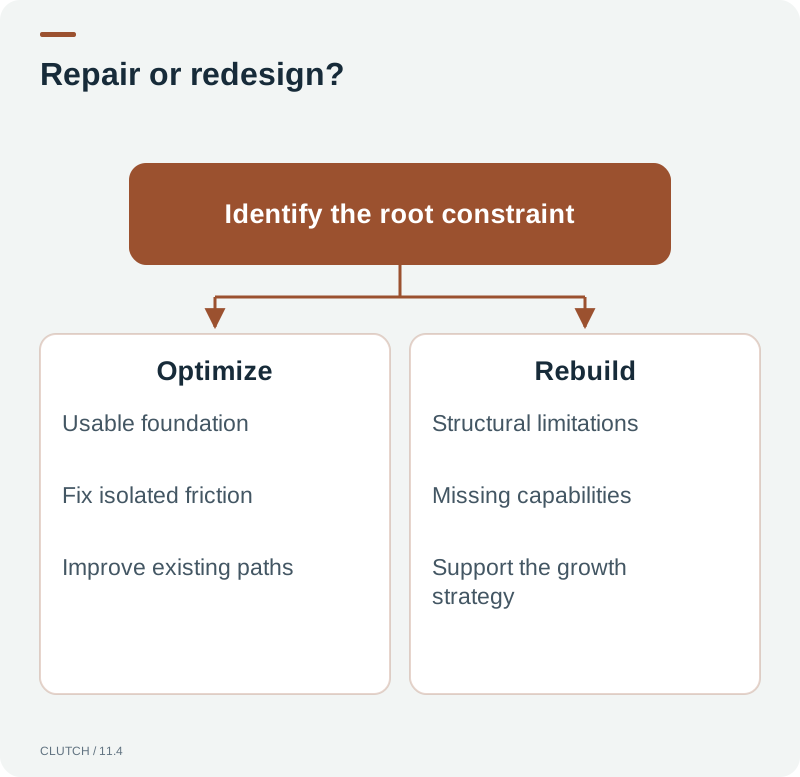
The repair versus redesign decision depends on whether the problem is friction that can be optimized or structural limitations that require a rebuild.
When Should a Website Be Redesigned?
A website should be redesigned when the problems are structural or revenue-critical and cannot be fixed through optimization alone. If the architecture cannot support the current business, if the technology is too rigid to integrate with needed systems, or if the cost of patching exceeds the cost of rebuilding, a redesign is the right decision. If the problems are friction, content, or tracking, optimization and integration are more cost-effective than a full rebuild.
The question is not whether the website is old but whether it is functional for the business's current needs. An older website with solid architecture and good content can be updated without a full rebuild. A newer website with structural problems may need more work than its age suggests.
When Should a Website Be Optimized Instead?
Optimization is the right approach when the architecture is sound, the technology supports needed integrations, and the problems are in the friction or content layers. Improving messaging, fixing forms, adding trust signals, optimizing page speed, and improving mobile usability can significantly increase conversion without the cost and disruption of a rebuild. Optimization is also faster, which means results come sooner.
The decision comes down to whether the foundation is solid enough to build on. If the foundation is good, optimize. If the foundation is the problem, rebuild. A professional assessment can help you determine which situation applies before committing budget to either approach.
Does an Old Website Automatically Need Replacement?
No. Age alone is not a reason to rebuild. A website should be evaluated based on its structural soundness, technical capabilities, content quality, conversion performance, and ability to support the current business. Some websites built five years ago are structurally excellent and need content and conversion optimization. Some websites built two years ago have fundamental architectural problems. The decision is based on diagnosis, not the date on the footer.
How Do You Know Whether SEO or UX Is the Problem?
If the site receives traffic but visitors do not convert, the problem is likely UX, messaging, or conversion friction. If the site does not receive traffic but the content and service offerings should be generating search interest, the problem is likely SEO, architecture, or technical accessibility. If both are true, both need attention. Google Search Console tells you whether pages are indexed and receiving impressions. Analytics tells you what visitors do after arriving. The combination of these data sources helps isolate whether the problem is discovery, experience, or both.
How Can Search Console Help?
Google Search Console provides data about how Google sees your site. It shows which pages are indexed, which queries trigger impressions, your average position for those queries, and any crawl errors or coverage issues. If important pages are not indexed, Search Console will show you. If pages are indexed but not receiving impressions, the content or keywords may not match what users search for. Search Console is the starting point for diagnosing search visibility problems.
How Can Analytics Help?
Google Analytics, specifically GA4, shows what visitors do after arriving. It tracks engagement, conversion actions, traffic sources, and user journeys. If traffic arrives but does not convert, analytics shows where the drop-off occurs. If certain traffic sources produce more qualified leads, analytics identifies which. If mobile users behave differently from desktop users, analytics reveals the difference. Combined with Search Console data, analytics provides a complete picture of where the website succeeds and where it fails.
When Should Paid Ads Stop Being Sent to a Weak Website?
If paid traffic is being sent to a website with conversion friction, the ad budget is being partially wasted. The cost per lead is higher than it should be because a percentage of visitors who would have converted on a better site are leaving due to friction. Before increasing ad spend, evaluate whether the conversion path is strong enough to justify the additional traffic. If the conversion rate is low, fixing the website first will improve the return on every dollar of ad spend. Sending more traffic to a leaking funnel increases the leak.
Should Businesses Fix Traffic or Conversion First?
Generally, fix conversion before investing more in traffic. A website that converts at 4 percent produces four times as many leads from the same traffic as a site that converts at 1 percent. Improving conversion is the higher-ROI investment because it multiplies the value of existing and future traffic. Once conversion is strong, investing in traffic becomes more productive because each visitor has a higher probability of becoming a lead.
The Website Health Self-Assessment
Use this self-assessment to evaluate your website's health. Answer honestly. If multiple answers point to problems, consider a professional assessment to determine the severity and the right course of action.
Can a visitor understand what your business does within 10 seconds of arriving?
Does your website convert at a rate you are satisfied with given your traffic volume?
Are all important service pages indexed in Google Search Console?
Does every form submission trigger an immediate response or notification?
Can you track which traffic sources produce leads and revenue?
Is your mobile experience tested and functional for every conversion path?
Do your page speed scores meet acceptable thresholds in PageSpeed Insights?
Is your site architecture organized and logical, or has it grown chaotic?
Do your service pages contain specific, differentiated content or generic descriptions?
Can your website integrate with the CRM, calendar, and marketing tools your business uses?
Does your website reflect your current service offerings and business model?
If you increased your marketing budget by 50 percent, could your website handle the additional traffic effectively?
Frequently Asked Questions
Frequently Asked Questions
How do I know if my website is losing leads?
Compare your traffic volume to your conversion volume in analytics. If traffic is consistent but form submissions, calls, and bookings are low, your website has a conversion problem. Review heatmaps and session recordings to identify where visitors drop off. If the conversion rate is below 1 percent for service businesses, the conversion path needs examination.
When should I redesign my website instead of optimizing it?
Redesign when the problems are structural or revenue-critical: the architecture cannot support the current business, the technology is too rigid to integrate with needed systems, or the cost of patching exceeds the cost of rebuilding. If the problems are friction, content, or tracking, optimization is more cost-effective. The decision is based on diagnosis, not the age of the site.
Does an old website automatically need to be replaced?
No. Age alone is not a reason to rebuild. A website should be evaluated based on structural soundness, technical capabilities, content quality, conversion performance, and ability to support the current business. Some older sites have excellent architecture and need content optimization. Some newer sites have fundamental problems. The decision is based on diagnosis, not the date.
How do I know if my problem is SEO or UX?
If the site receives traffic but visitors do not convert, the problem is likely UX, messaging, or conversion friction. If the site does not receive traffic but the content should generate search interest, the problem is likely SEO, architecture, or technical accessibility. Search Console shows whether pages are indexed and receiving impressions. Analytics shows what visitors do after arriving. The combination isolates the problem.
Should I stop running ads if my website is not converting well?
If your conversion rate is low, the ad budget is being partially wasted because visitors who would convert on a better site are leaving due to friction. Evaluate whether the conversion path justifies the ad spend. Fixing the website first will improve the return on every dollar of ad spend. Sending more traffic to a leaking funnel increases the leak.
Should I fix traffic or conversion first?
Generally, fix conversion first. A website that converts at 4 percent produces four times as many leads from the same traffic as one that converts at 1 percent. Improving conversion multiplies the value of existing and future traffic. Once conversion is strong, investing in traffic becomes more productive because each visitor has a higher probability of becoming a lead.
How can I tell if search engines are struggling with my site?
Check Google Search Console's coverage report for crawl errors, excluded URLs, and pages not indexed. Verify your XML sitemap includes all important pages. Check that canonical tags are configured correctly. If important service pages are not indexed or not receiving impressions, search engines are struggling to discover or understand your content.
What is the most common website problem that costs leads?
The most common problem is a dead end after conversion. Forms submit to an inbox that is checked periodically with no automatic notification, CRM entry, or follow-up. The lead sits until a human processes it, which may be hours later when the prospect's interest has cooled. Connecting form submissions to immediate routing and automated response is one of the highest-ROI fixes a business can make.
Find out whether your current website needs optimization, structural repair, or a complete rebuild.
A website that looks acceptable can still be quietly losing leads, sales, and search visibility. Clutch Digital Development diagnoses website problems across all five severity levels and recommends the most cost-effective path forward, whether that is conversion optimization, technical repair, or a full rebuild.
Tags:#signs you need a new website#website losing leads#website not generating leads#website redesign signs#bad website performance#website conversion problems#website SEO problems#website audit
READY TO PUT AI TO WORK?
What Could an AI Sales Agent Do for Your Business?
Every business handles leads differently. We'll look at your current sales process, lead volume, response times, follow-up, staffing, and opportunities to determine where an AI Sales Agent could have the biggest impact.
Traditional SEO reporting captures only one discovery environment. The Multi-Engine Visibility Audit measures seven categories of visibility, identifies blind spots, and connects discovery to business outcomes.
A high-converting website is not a digital brochure. Learn the Revenue Website Stack, the seven layers that determine whether your site turns traffic into leads, appointments, and sales.
A Smart Website is connected to the systems that handle lead capture, qualification, routing, follow-up, and measurement. Learn the six capabilities that separate it from a traditional brochure site.